
Checklist Box vs. Obstruction Box
How to understand your client portal
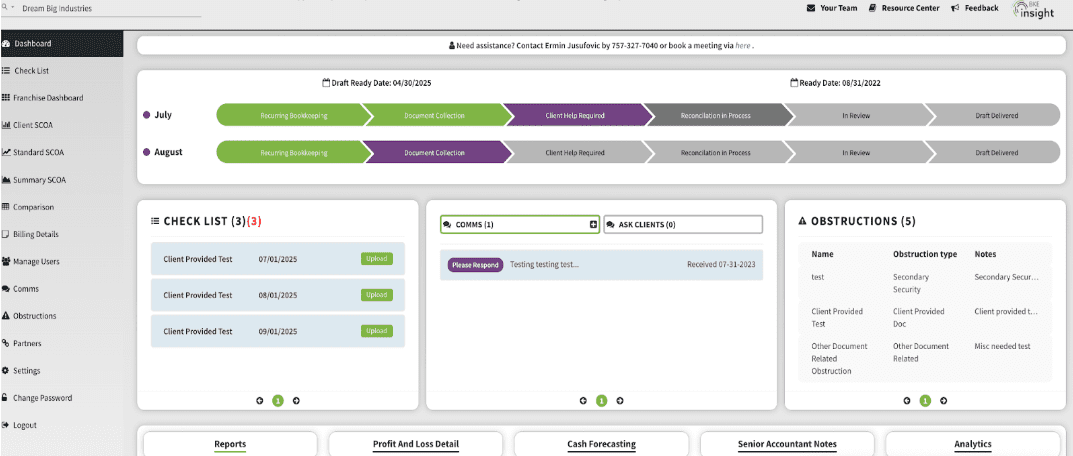
In your portal, you’ll see two important sections that help us stay on track with your bookkeeping: the Checklist Box and the Obstruction Box. Please see the image of the boxes at the bottom of this article. While the same document may show up in both, they serve different purposes.
✅ Checklist Box
Purpose
A recurring monthly list of the standard documents we need you to provide us to complete your books.
How it works
- On the first day of each month, a new checklist is automatically created.
- It includes that month’s required documents (e.g., bank statements, sales reports).
- Note: If you later decide with your Senior Accountant that it would be more efficient for BKE to gather these items instead, we’re happy to coordinate that process change with your assigned Documents Manager.
- Once you upload the requested files, the item is marked complete.
Think of it as
Your “to-do list” for keeping your bookkeeping current.
⚠️ Obstruction Box
Purpose
A running list of past-due items that are preventing us from finishing your books.
How it works
- If a document from the checklist has not been uploaded by its due date, it also appears in the Obstruction Box.
- Items remain here until we receive them, even if they are still showing in your monthly checklist.
Think of it as
Your “urgent items” list — what’s holding us back from closing your books.
📌 Why the same document may appear in both
- In the Checklist Box, because it’s part of this month’s standard request.
- In the Obstruction Box, because it’s overdue and blocking progress.
🏁 Bottom line
- Use the Checklist Box to stay proactive each month.
- Watch the Obstruction Box to see what’s holding up your bookkeeping.
- Once overdue documents are uploaded, they disappear from the Obstruction Box, and we can move forward with completing your books.
📷 See example: A screenshot of the Checklist and Obstruction Boxes appears below for reference.